
How to Reimburse in Your ClassWallet Account: A Step-by-Step Guide
Welcome to Coral Academy’s guide for reimbursement through your ClassWallet account. If you’ve paid for our subscriptions, out-of-pocket and want to be reimbursed using your ESA funds, follow the steps below to ensure your reimbursement is processed smoothly.
What is Reimbursement in ClassWallet?
Reimbursement is the process through which parents or guardians pay for an eligible educational service or product out of pocket and then submit the expense for ClassWallet to reimburse you from your ESA (Education Savings Account) funds. This process ensures that you can access the full benefit of your ESA funds without waiting for upfront payments from your ESA account.
Eligibility for Reimbursement
Before you submit a reimbursement request, please ensure the following:
- Vendor is approved: Coral Academy is ESA-approved in following states:
- Arizona
- Arkansas
- New Hampshire
- South Carolina
- You are eligible for the ESA program: Parents must be enrolled in an eligible ESA program and have an active ClassWallet account.
- To check if you are eligible in Arizona, Arkansas, New Hampshire or South Carolina, please visit the following links
- To check if you are eligible in Arizona, Arkansas, New Hampshire or South Carolina, please visit the following links
- Payment Proof: You’ll need to provide proof of payment (receipt or invoice).
Important: To submit a reimbursement request, you must have a ClassWallet account. If you don’t have an account yet, please reach out to help@classwallet.com to get started.
Step-by-Step Guide to Reimbursement
Step 1: Purchase weekly subscription on Coral Academy
- First, you need to pay for the subscription on our online learning platform using your personal funds. Keep your receipt or invoice safe.
- You can find invoice in Coral Academy website using this path: Profile > Settings > Billings > Download invoice
Step 2: Log Into Your ClassWallet Account at www.classwallet.com
Step 3: Go to the Reimbursement Section
Once logged in, you will be directed to your dashboard.
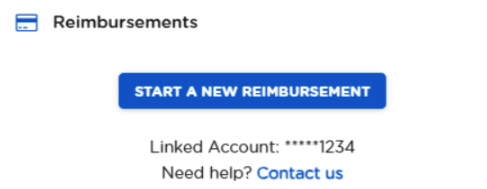
- You can select 'Start New Reimbursement' from the menu or click the 'Start New Reimbursement' button under the reimbursement section.
- This section allows you to upload the documentation needed to process the reimbursement.
(OR)

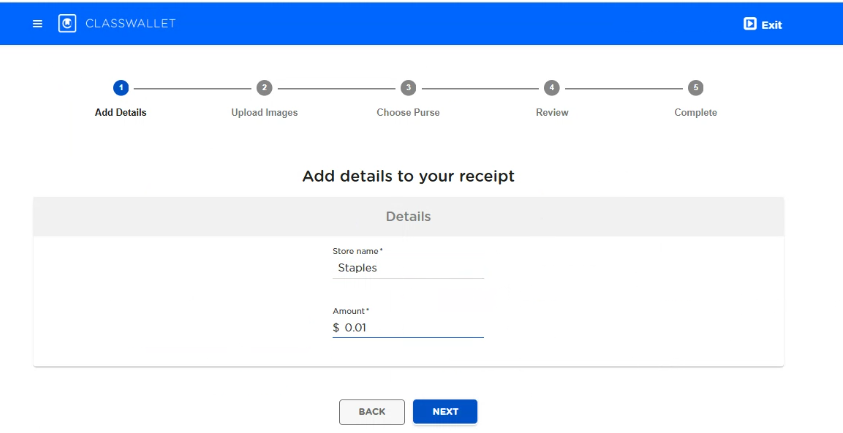
Step 4: Add details for your transaction
- Under Store name, write ‘Coral Learning Academy LLC’ and under Amount, write the dollar amount for your reimbursement transaction.
- If you’re submitting a partial payment reimbursement (e.g., if only part of the amount was paid via ESA), include the specific amount you want reimbursed.
Step 5: Add Invoice/Receipt Images
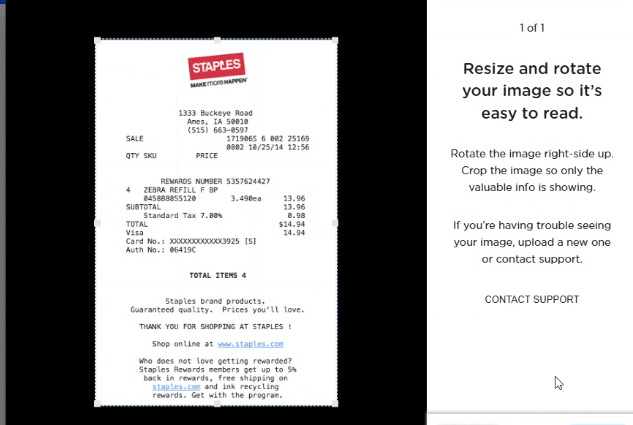
- Upload as many images as necessary to document the transaction.
- JPEG, PNG, or PDF (10 MB, five pages max) are accepted file formats and sizes.

Step 6: Choose Purse
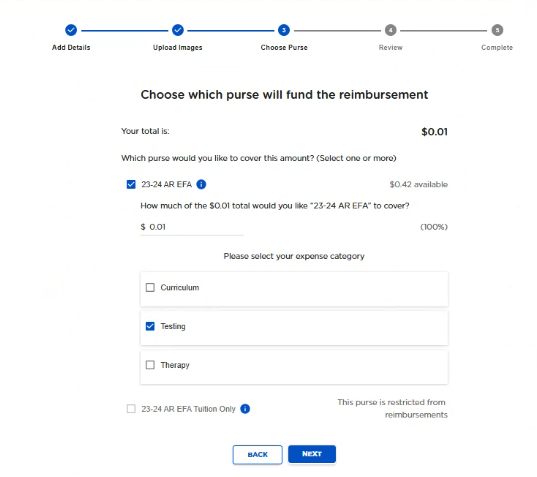
- The next step is to choose which purse you want to use and ensure all the information is correct. You can use funds from multiple purses but must select at least one. Once you have completed this, click the blue 'Next' button, and your reimbursement request will be submitted to your administrator.
- Funds not available for reimbursement will be grayed out and marked 'Restricted from Reimbursements.' If you need to use these funds, contact your administrator.
Step 7: Review Details
- The final step is to review your reimbursement request before submitting it.
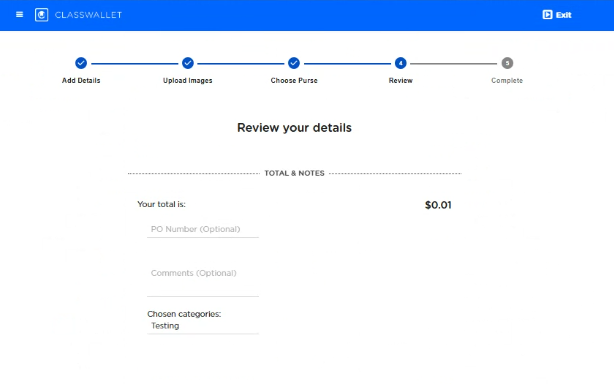
- ClassWallet will process your request, which typically takes 3-5 business days depending on the volume of requests and the complexity of the transaction.
Step 8: Reimbursement Approval & Payment
Once your reimbursement is approved:
- ClassWallet will transfer the funds directly to your linked bank account.
- You will receive an email notification that your reimbursement is complete, along with the transaction details.
Note: If any issues arise during the review process, you may be asked to provide additional information or clarification. Be sure to keep all receipts, invoices, and supporting documents in case they are needed for verification.
Common Questions (FAQ)
1. How long does the reimbursement process take?
The review process typically takes 3-5 business days, but in some cases, it could take longer if additional verification is needed. You will receive an email notification once your reimbursement is approved.
2. What if my reimbursement is denied?
If your reimbursement request is denied, you will receive a notification explaining the reason. Common reasons for denial include:
- The service/product is not ESA-approved.
- Incorrect or incomplete documentation.
If denied, you can correct the issue and re-submit your request.
3. Can I be reimbursed for purchases made in previous months?
Yes, as long as the purchase was made during the current school year and is within the ESA guidelines. Be sure to submit the reimbursement request as soon as possible to avoid any delays in processing.
4. What if I don’t have a receipt?
A receipt or invoice is required for reimbursement. If you don’t have one, contact Coral Academy at support@coralacademy.com to request a copy of the document. Without proper documentation, the reimbursement will not be processed.
5. How do I know if I’m eligible for reimbursement?
You can verify eligibility by checking your state’s ESA guidelines or reaching out to your ESA program administrator. Here are few links for the states we are approved in to help you:
- Arizona Empowerment Scholarship Account
- Arkansas Education Freedom Account Program
- New Hampshire Education Freedom Account Program
- South Carolina Education Scholarship Trust Fund Program
6. How does the Coral Unlimited subscription work?
You can refer to the Coral Unlimited document on our online learning platform to understand in detail.
Need Assistance?
- For invoice or subscription-related issues, contact Coral Academy support at support@coralacademy.com.
- For status of your reimbursement or issues while uploading, contact ClassWallet Support at help@classwallet.com.