
Pay As You Go at Coral Academy
Coral Academy now offers Pay As You Go (Pay-Per-Class)—a flexible way to enroll without committing to a weekly subscription. It’s simple, parents can pay weekly for only the individual class(es) their learner wants to take, without needing an unlimited plan.
What is Pay As You Go?
Pay As You Go model lets you enroll in a specific class you like and pay a weekly recurring amount per learner for that class. Each class has its own price.
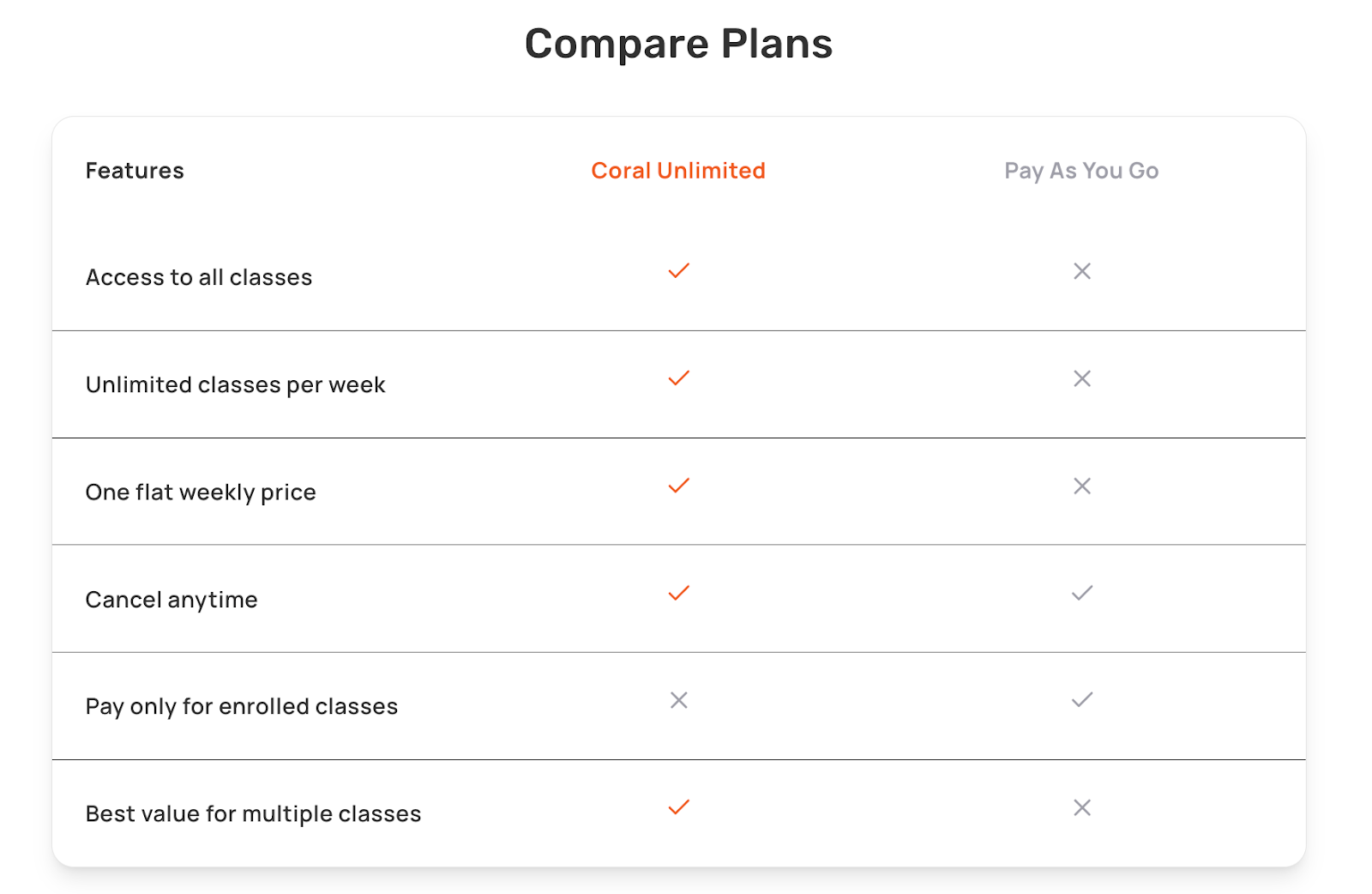
If you want access to multiple classes each week, we recommend Coral Unlimited Subscription for maximum family value.
Know more about the coral unlimited subscription here.
Please Note:
● Enrollment is subject to seat availability. Each class has limited seats to ensure quality learning.
● The Pay As You Go model is billed per learner, so if you have multiple learners, you’ll pay for each learner separately.
● Pay As You Go model gives access only to the specific class(es) your learner is enrolled in and not all Coral Academy classes.
● If a class has multiple timings, your learner can enroll in only one at a time—the schedule and curriculum are the same across timings, and the options are simply offered to accommodate families across time zones.
How billing works in Pay as you go model
When you choose Pay As You Go model:
- You’re billed weekly for the class you’re enrolled in.
- Billing is per learner (two learners = two enrollments).
- You will be billed separately for every individual class you purchase using Pay as you go model.
Billing & Failed Payments
How billing works
For Pay As You Go enrollments, billing depends on when you enroll relative to the class session:
- If you enroll more than 3 days before the session, your payment method will be automatically charged 3 days before the session. Your enrollment will only be processed once we successfully receive your payment. You can cancel your upcoming enrollment anytime via Enroll -> Select Learners -> Cancel enrollment.
- If you enroll within 3 days of the session start, your payment will be charged immediately at enrollment, and the class seat will be confirmed only after successful payment.
Failed payments
- If an automatic charge (made 3 days before the session) fails, we’ll notify you by email right away. You’ll have a 3-day grace period to update your payment method. Enrollment will only be processed once we successfully receive the payment for the session.
- If the payment isn’t completed within this 3 day grace period, your learner will not be enrolled in the session.
- For enrollments made within 3 days of the session, payment must succeed immediately—there is no grace period in this case.
Activation Details
Class access starts immediately after successful enrollment and payment. After that, your payment renews automatically every week on the same day as your initial charge, as long as your learner remains enrolled in that class.
You can cancel anytime and you’re always welcome to re-enroll later. If a class you’re enrolled in is canceled or rescheduled, we’ll notify you in advance so you can plan accordingly. We will process a refund if you were unable to attend class due to cancellation/ rescheduling from our end.
Cancelling or withdrawing (what happens)
You can cancel your weekly billing for a class anytime simply by withdrawing from that class.
- When you withdraw, your learner is removed from the class immediately and will no longer have access to that session.
- After withdrawal, weekly charges stop, and your Pay As You Go subscription for that class is canceled.
- If you withdraw anytime before the session starts, we’ll process a refund back to your original payment method. Please allow 24–48 hours for the refund to be completed due to processing time.
- If you withdraw after the session has already taken place, refunds are not issued for that session.
You’ll always see a warning message before withdrawing from a class so it’s clear what will happen to your access and billing.
If a class session is cancelled or rescheduled
If we need to cancel a session during any week, we’ll do the following:
- Issue a refund for that cancelled session/week (without you needing to cancel your Pay As You Go enrollment)
- If a class is rescheduled within the same week, your billing typically doesn’t change—we’ll notify you of the updated timing. However, if you are unable to attend the class, we will process a refund upon receiving your request.
Switching Between Plans
● Switching from Pay As You Go to Coral Unlimited:
Switching is simple—just purchase a Coral Unlimited subscription from Settings → Coral Unlimited. Your existing class enrollments will continue without interruption. If you’ve already paid for an upcoming Pay As You Go session and upgrade to Coral Unlimited before that session starts, we’ll refund the Pay As You Go amount back to your original payment method.
● Switching from Coral Unlimited to Pay As You Go:
You can switch by canceling your Coral Unlimited subscription and then enrolling in individual classes using the Pay As You Go model.
When Coral Unlimited is the better deal
If your family plans to take multiple classes per week, Coral Unlimited is usually the best value because it unlocks all classes for one flat weekly fee. Read more about Coral Unlimited here.
Compare our plans here: Pricing
Have any questions or need help? We’re here for you—reach out anytime at support@coralacademy.com.